
The three trigger types
The rule of thumb: event-based triggers are often the best choice — the agent runs only when there is actual work, and it reacts instantly. Scheduled triggers can work, and manual triggers have their place for workflows a human should start deliberately. But the rule that holds for every type: make the trigger as precise as possible.
A real example: a meeting-briefing agent first ran on a daily 8 AM schedule. Weekend runs found nothing, and meetings booked during the day were missed entirely. Rebuilt with an event trigger — wake up 15 minutes before each meeting — it runs only when there actually is a meeting, always with fresh information.
Cost example: checking for new items on a tight schedule costs around 0.50 per month. That is roughly 100x cheaper.
Make every trigger as specific as possible
Use trigger conditions so the agent does not run on irrelevant events — every filtered-out event is a run you don’t pay for and an error that can’t happen.
Specific triggers = fewer runs, lower cost.
Manual triggers you already have
The best trigger is often a quick action you already do in your daily tools — no new infrastructure needed:Approvals as triggers
Human-in-the-loop checkpoints can be built with triggers: the agent sets a field, status, or label and stops; a human changing that value is the event that triggers the next step. This gives you an approval gate without extra infrastructure — see Shape agent behavior for the HITL pattern. Here’s a real agent using several trigger types at once — including two Slack-reaction triggers as approval gates (👍 advances the candidate, 👎 rejects):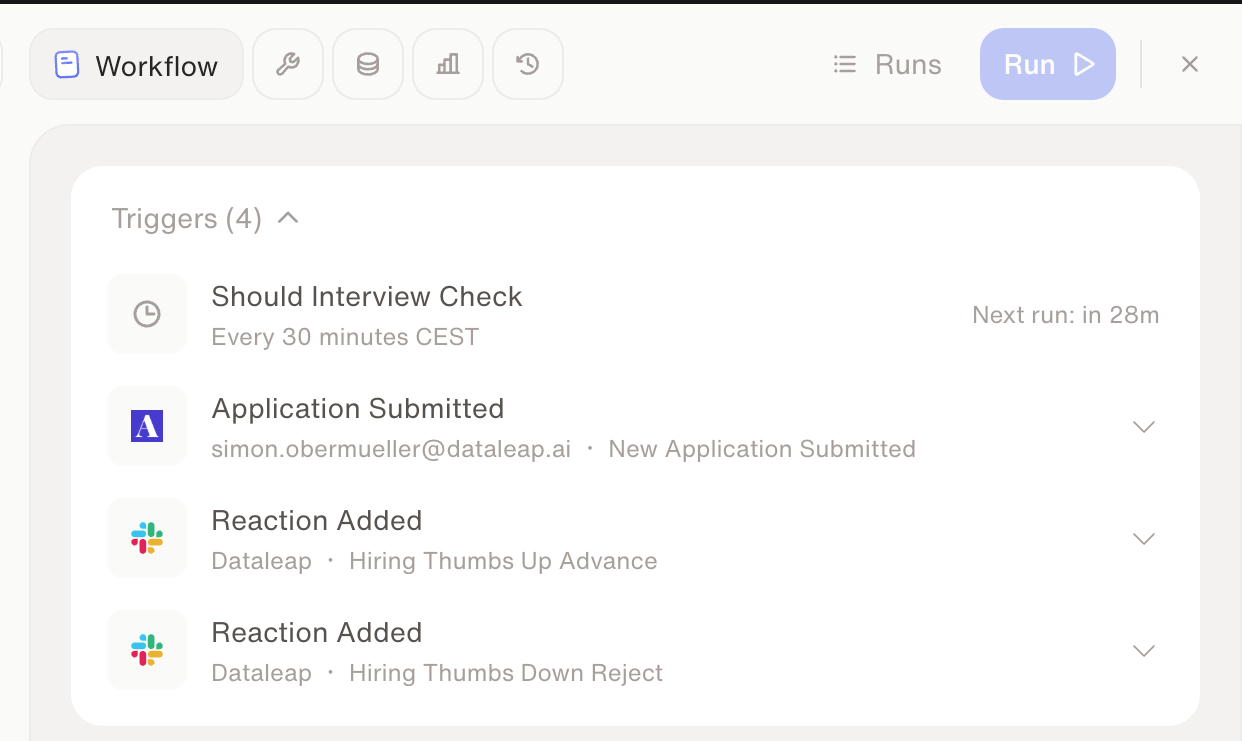
One hiring agent, four triggers: a schedule, an application event, and two reaction-based approvals.
Two things that bite
Watch: Triggers — or how to wake up your agent
See how triggers are set up in the product.
Versioning
Next: iterate on your agent without fear of breaking it.
Credits & usage
How trigger choice fits into overall spend control.